
Set the MCP permission boundary
Open Security → Access Scope (#access). This controls which MCP tools and routers the server process may use. It does not change RouterOS accounts or firewall rules.
Build a policy
- Switch Enforcement on/off and optionally label the policy.
- Set Maximum risk, or use Read only / Routine changes. Idempotent writes still require the WRITE ceiling.
- Allow all configured routers, including future ones, or choose specific routers. Explicit blocks win.
- Pick allowed/blocked tools or enter case-insensitive
*patterns. Patterns match tool names, not their arguments or raw commands.
Permission lens previews a target router and tool without running it. Counts and newly allowed/blocked changes are scoped to that preview target. Capabilities, module availability, arguments and approvals remain separate checks.
Review, apply, keep
Select Review changes, inspect the diff and expanded permissions, then Apply for 60 seconds. The policy affects subsequent calls immediately. Choose Keep changes before the deadline or Revert now; the server auto-reverts an unconfirmed change even if the tab closes.
A pending Config Studio change must be settled there first. If saving times out, reload the saved policy to establish the actual outcome. A process started without a configuration file must use the reported saved file on future launches to retain the setting.
Understand effective restrictions
The applied-runtime panel shows the operator policy, server read-only mode and session narrowing. Saving this page preserves session restrictions. narrow_access_scope can narrow or expire a session; this editor cannot remove that narrowing.
Blocked-call history records real denials and reasons in this process; previews do not appear there. This history resets on server restart.
See Access Scope settings for precedence and examples.
Screen preview
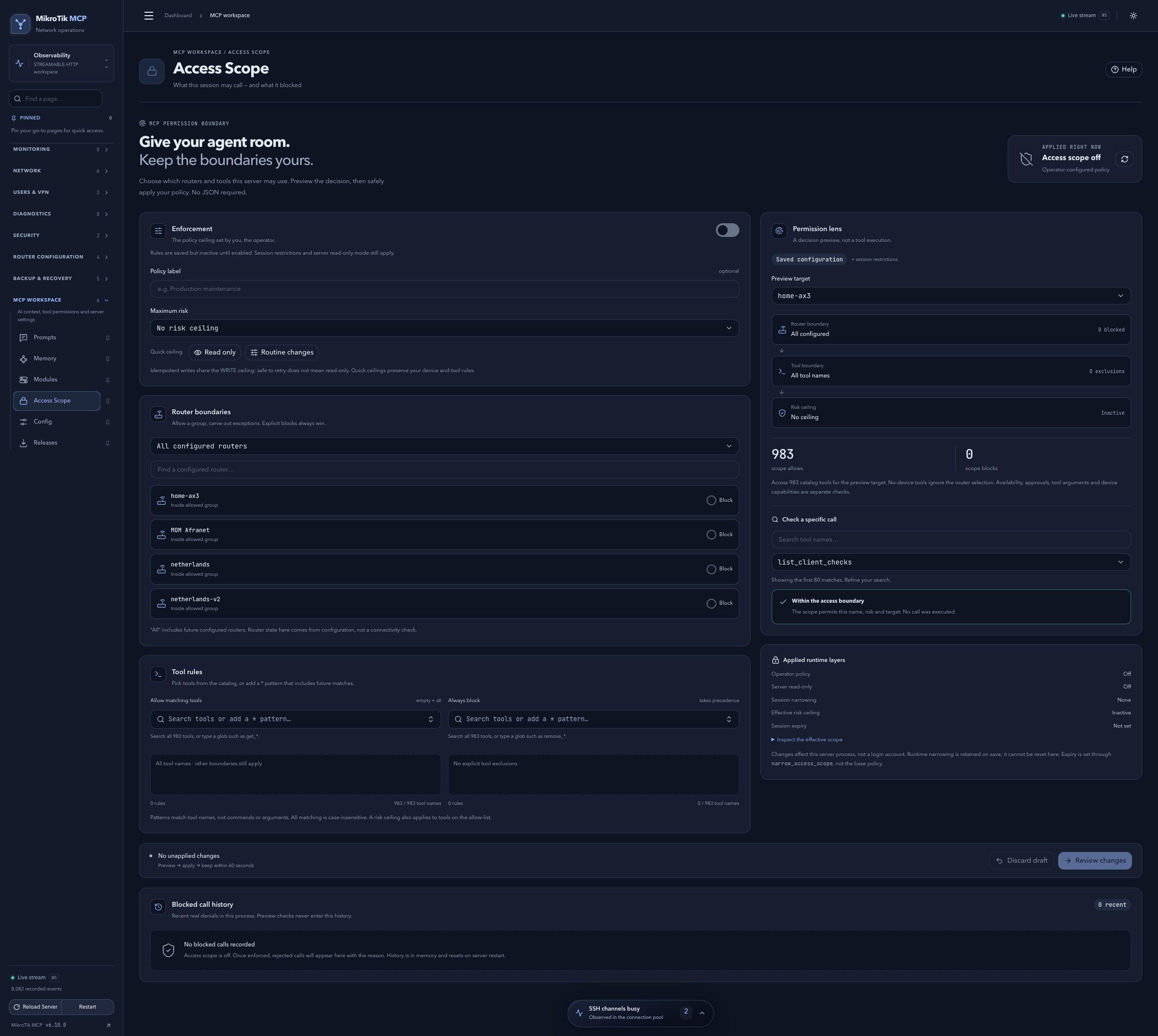 Full-page dashboard preview with IP addresses and snapshot/backup names blurredFull page · Click to enlarge ↗
IP addresses, snapshot/backup names and AAA/OpenVPN usernames are blurred in this full-page capture.