
Model a request and its reply
Open Diagnostics → Round-trip Lab (#round-trip). This is a saved-configuration simulation, not a live connectivity test.
- Enter client/destination IPv4, protocol (TCP, UDP or ICMP), and TCP/UDP ports. The default source port
49152is hypothetical; replace it with the actual port when modeling a specific flow. - Add outbound routers in order, selecting one saved configuration per router and its entry/exit interfaces.
- Keep the explicitly labeled mirrored-return assumption, or edit the return path independently.
- Choose Check both directions.
Use the arrow buttons to reorder hops and the remove button to drop a hop. At most eight routers per direction are supported. If choices are missing, capture a configuration in Snapshots, then Refresh choices.
Evidence limits
The default maximum snapshot age is 15 minutes, with captures at most two minutes apart. Expand Evidence limits & technical preview to review the generated input and adjust age (1–86,400 seconds) or capture gap (0–3,600 seconds). Larger limits do not make old evidence current.
You declare the links; the lab does not discover physical wiring. Mirroring reverses router order and swaps entry/exit interfaces as a test assumption.
Interpret the result
Results distinguish Allowed in the model, Blocked in the model and Cannot determine. Inspect both directional cards, assumptions and snapshot provenance.
NAT rewriting, unsupported configuration or incomplete evidence can prevent a conclusion. “Cannot determine” does not mean the network is broken. Even an allowed model does not verify VPN state, application responses, physical delivery or IPv6 connectivity.
See the model's supported rules and boundaries and trace_round_trip.
Screen preview
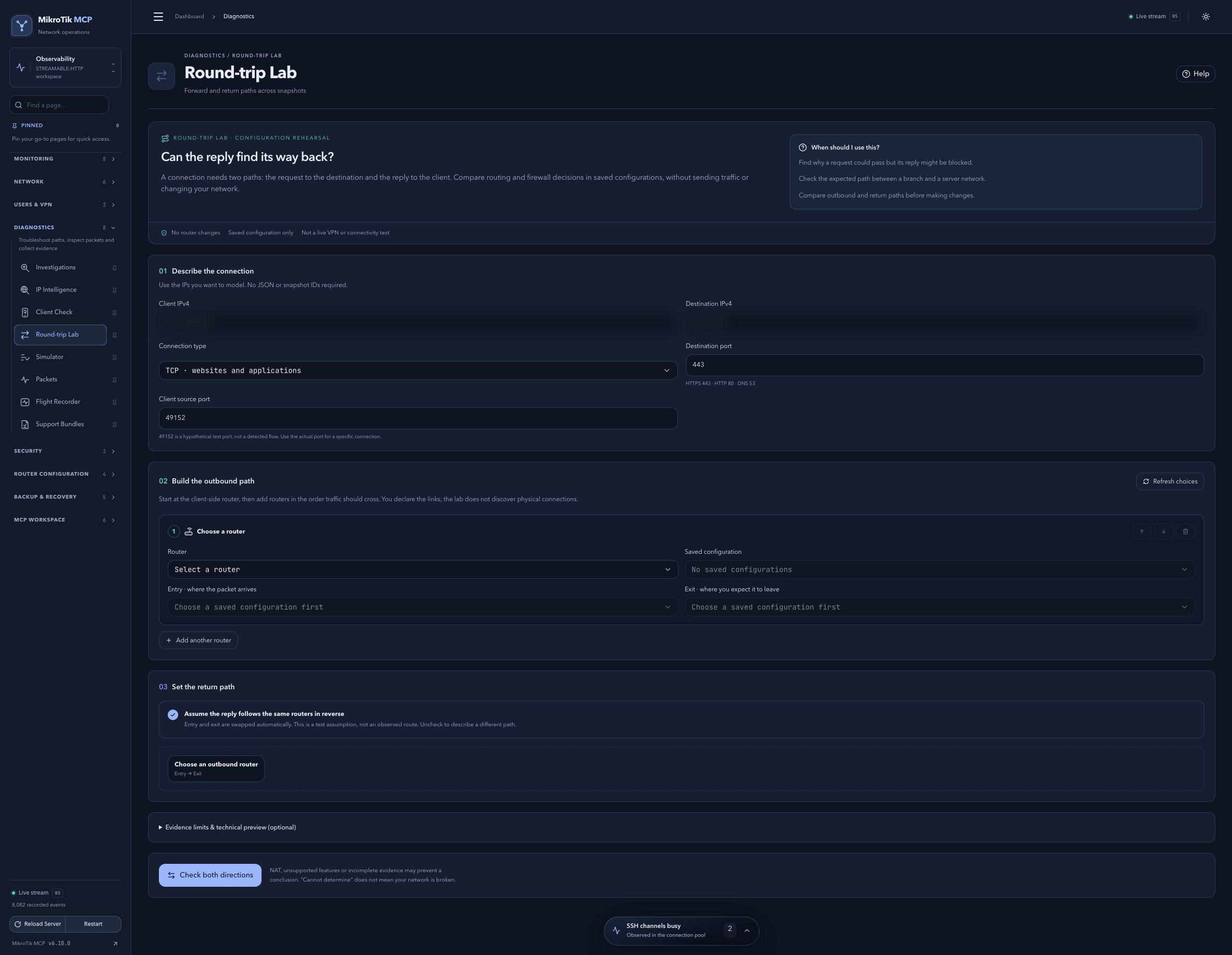 Full-page dashboard preview with IP addresses and snapshot/backup names blurredFull page · Click to enlarge ↗
IP addresses, snapshot/backup names and AAA/OpenVPN usernames are blurred in this full-page capture.