
Find hosts behind a port
Open Network → L2 Fabric (#fabric), choose a router and select Refresh.
The view groups bridge-host observations by physical interface. Each port card shows its bridge, inferred role, host count and visible hosts. Rows can include a hostname, MAC address, IP address, hardware vendor and a network-device indicator.
Search matches host labels, MAC addresses, IPs and interface names. It filters the displayed host rows; the summary and port host counts describe the captured inventory.
Read occupancy carefully
The summary counts occupied ports, hosts, access ports, uplinks and unidentified hosts. Port roles are inferred from observations, not a cable certification or authoritative topology declaration.
Unlike Topology, which focuses on discovered neighbors, this view uses the bridge host table and identity enrichment. It cannot guarantee visibility of every attached device: inactive hosts or switch-chip offload can leave the table empty or incomplete.
This page only reads evidence. Use it to locate a host's likely port before deciding whether a configuration change is needed.
See network workspaces.
Screen preview
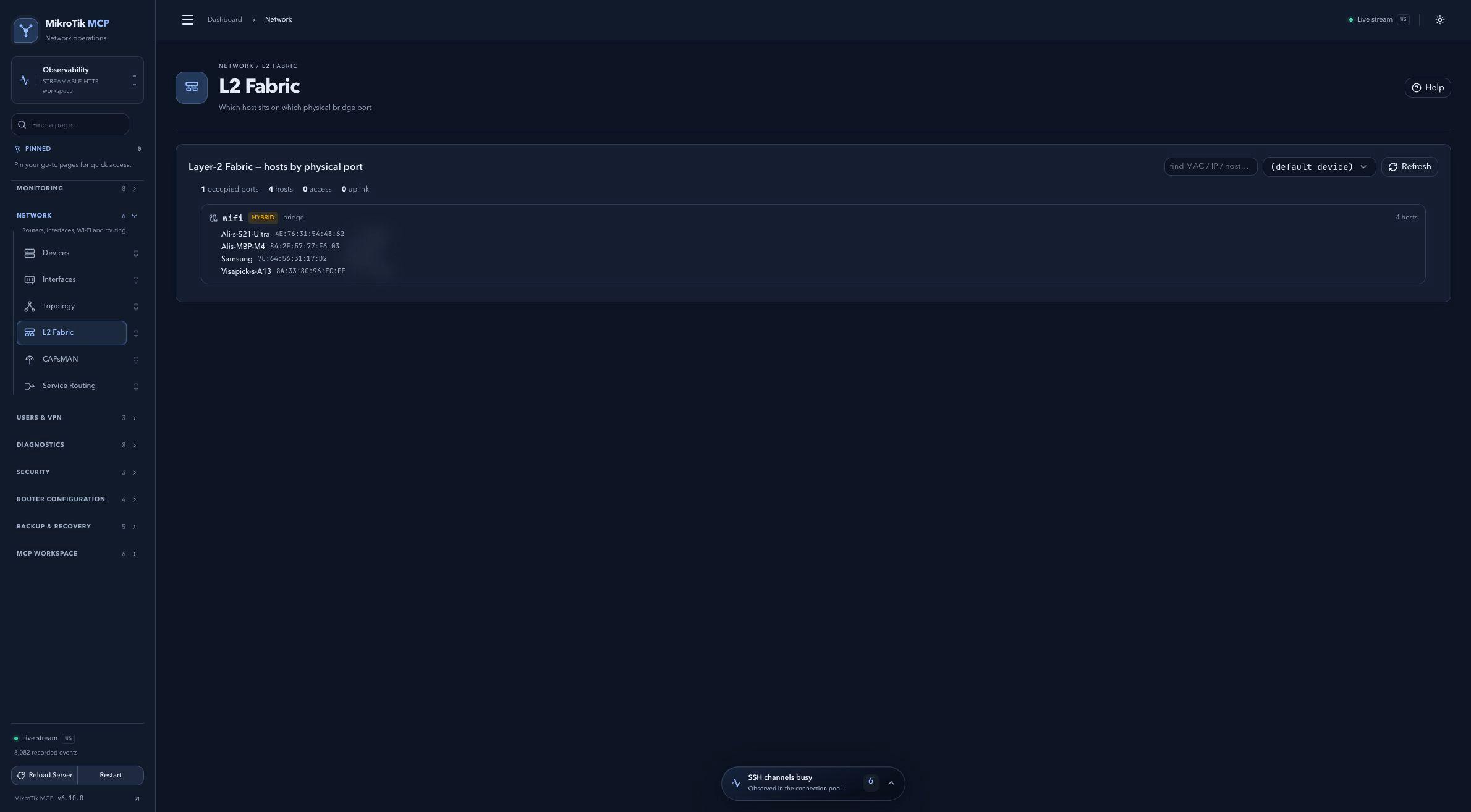 Full-page dashboard preview with IP addresses and snapshot/backup names blurredFull page · Click to enlarge ↗
IP addresses, snapshot/backup names and AAA/OpenVPN usernames are blurred in this full-page capture.