
Trace before changing a router
Open Diagnostics → Simulator (#simulator). This page evaluates configuration models; it does not transmit the hypothetical packet or apply your proposed commands.
Trace one packet
- Choose a preset or enter source/destination IPv4 addresses, protocol, ingress interface and ports.
- Declare the connection state:
new,established,relatedorinvalid. The model has no live connection-tracking table. - Select Trace and inspect the verdict, traversal, configuration source and coverage warnings.
- Paste proposed RouterOS lines under Proposed change and select Simulate change to compare before/after verdicts and the first divergent step.
An UNKNOWN result is unresolved, not permission to proceed. Exported configuration omits runtime-learned routes; missing model routes can therefore differ from the live router. Unsupported matchers and route-liveness assumptions are reported.
Verify an entire address space
Policy verifier checks a source/destination range and port range against a pasted static export. Choose the filter chain, TCP/UDP, declared state and required verdict. Addresses are interpreted at filter entry, after destination NAT.
Use a complete export without secrets, then select Verify address space. The report shows checked cells, scope and either a proof within that scope, a counterexample with deciding rules, or Unknown. It is filter-only and contacts no router.
Find shadowed rules
Reachability → Refresh lists filter rules and those the static model considers unreachable, with the shadowing rule. Disabled rules are dimmed. This does not remove rules.
See model boundaries and examples, policy verification and round-trip analysis.
Screen preview
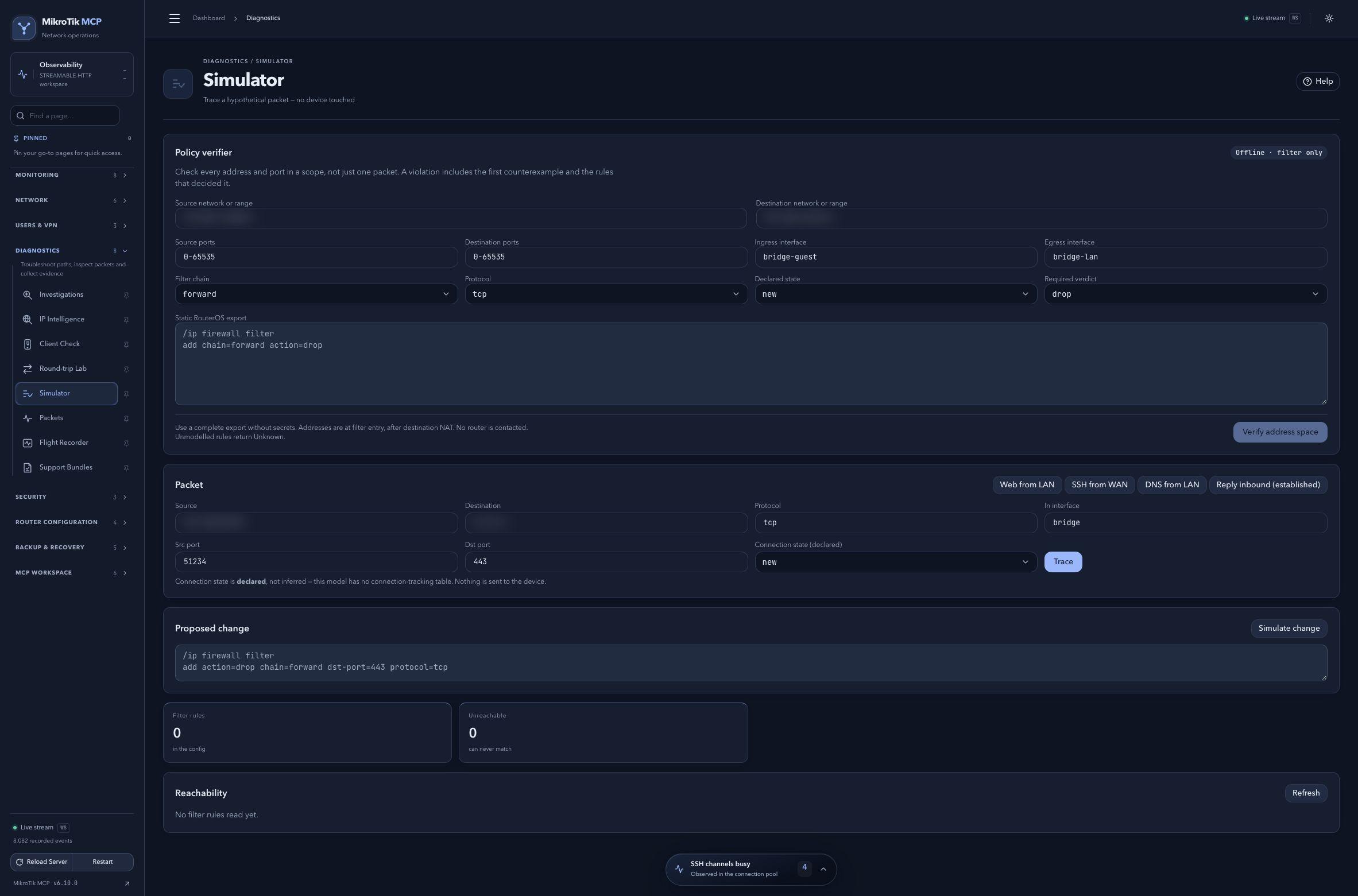 Full-page dashboard preview with IP addresses and snapshot/backup names blurredFull page · Click to enlarge ↗
IP addresses, snapshot/backup names and AAA/OpenVPN usernames are blurred in this full-page capture.